
Creating the Low Poly
The low-poly stage defines the balance between polygon count, shading, UV splits, animation requirements, and runtime performance. The goal is not simply to fit a triangle limit, but to distribute geometry logically.
A good real-time mesh spends geometry on silhouette, functional shapes, close-up interaction zones, moving parts, and areas that affect shading. Flat, hidden, repetitive, or bakeable details should not consume the same budget.
The low-poly stage is one of the first major optimization steps in the asset production pipeline. This is where we define the balance between polygon count, clean shading, UV splits, deformation requirements, and runtime performance.
One principle I have consistently observed in game production is that creating a low-poly asset is not only about fitting into a technical limit. The more important task is to distribute topology in an optimized and logical way.
A good low-poly mesh spends geometry where it actually matters: on the silhouette, functional shapes, close-up interaction zones, moving parts, and areas that affect shading. At the same time, it avoids wasting polygons on flat surfaces, hidden areas, repetitive details that can be baked, or parts that will rarely be seen by the player.
Before discussing topology optimization, it is important to understand why we cannot simply use high-density geometry, CAD output, or cinematic assets directly in a real-time VR project.
Why Triangle Count Is Only Part of the Story
Visible triangles are only one part of the real cost. UV seams, hard-normal splits, material boundaries, vertex colors, and skinning data can duplicate vertices and increase the data processed by the GPU. The same mesh may also participate in shadows, reflections, depth, and motion-vector passes.
“Triangle count” has been used as a familiar performance metric since the early days of consumer 3D accelerators. For artists, it remains a convenient way to estimate and communicate geometry complexity. However, from a technical perspective, rendering cost starts not with triangles, but with vertices.
A real-time mesh is not just a collection of visible polygons. It contains several types of vertex data:
- Vertex position
- Vertex normal
- UV coordinates
- Tangent and bitangent data
- Vertex color
- Bone weights
- Material assignments
- UV splits and hard-normal splits
This means that the visible triangle count and the actual amount of processed vertex data are not always the same thing. UV seams, hard edges, material splits, and skinning data can all increase the final vertex count processed by the GPU.
At runtime, mesh data is loaded, sent into GPU buffers, transformed, shaded, rasterized, and used in multiple rendering passes. Depending on the scene, the same geometry may also contribute to shadows, reflections, depth passes, motion vectors, or other rendering systems.
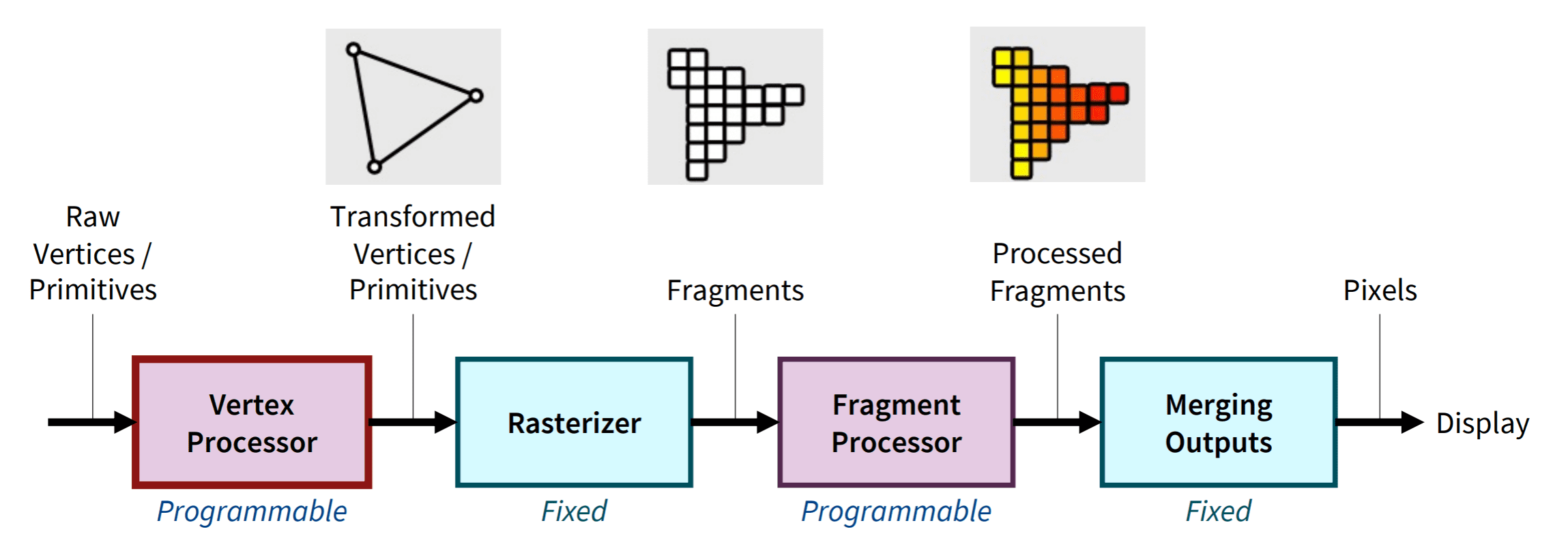
Graphics pipeline reference byYoungdo Lee· Source:Graphics Pipeline reference
The cost becomes even more complex when dynamic lights, transparent materials, reflections, and post-processing are involved. Performance does not always scale linearly. A scene may appear stable with millions of polygons, but after adding one more asset, one more light source, or one more expensive material, the frame rate can suddenly become unstable.
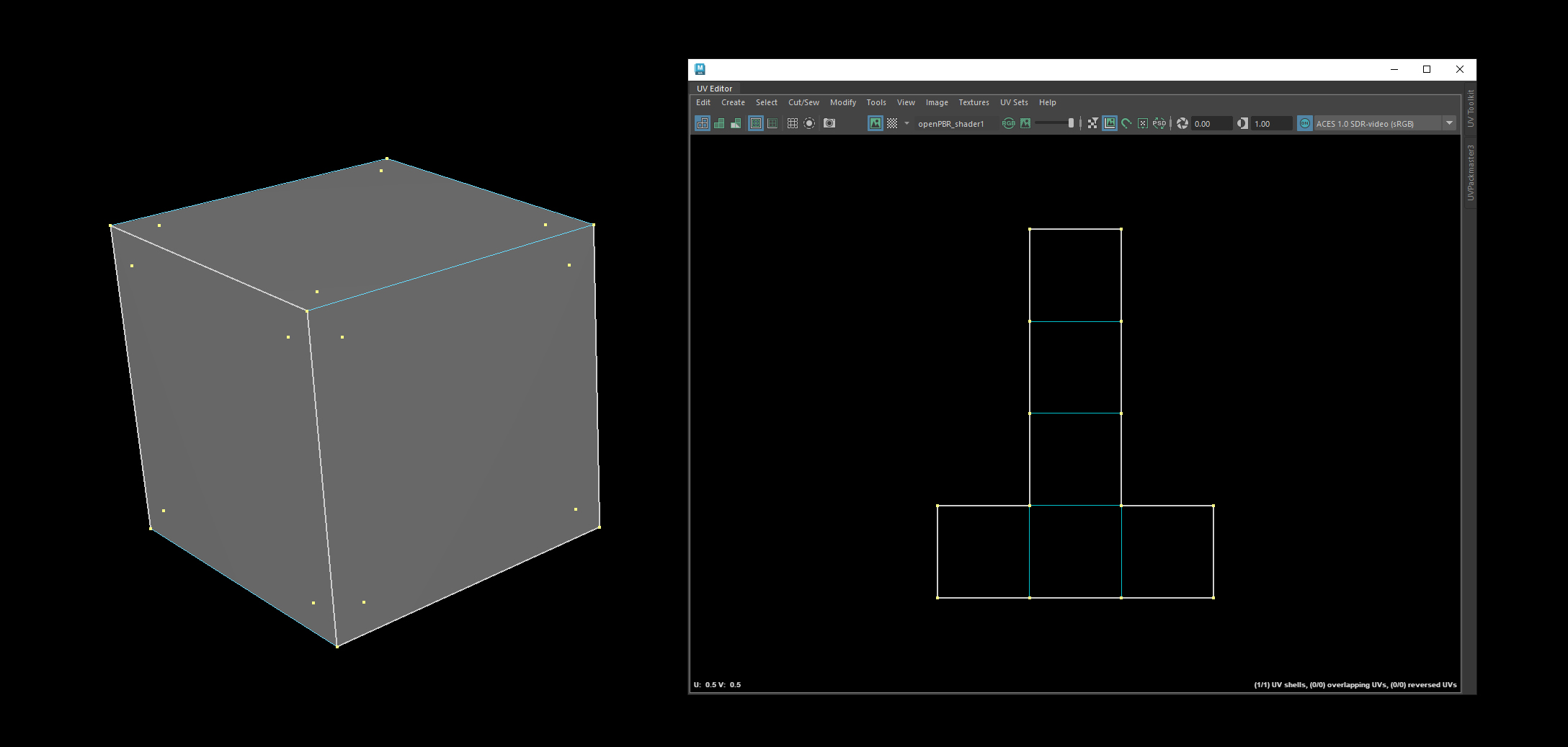
A cube contains only 8 geometric corner points, but a conventional game-ready cube with hard face normals requires 24 GPU vertices - four separate vertices for each of its six faces. After triangulation, it contains 12 triangles referenced by 36 indices.
Planning the Optimization Budget
Geometry budgets must begin with the target platform, frame rate, memory, worst-case frame, lighting, VFX, and the asset’s screen importance. For Direct Action, the average weapon target is approximately 10,000-40,000 triangles, rising to 60,000-80,000 for unusually complex assets.
A proper optimization strategy starts with understanding the target hardware.
Before defining the low-poly budget, the team needs to understand:
- Target platform
- Target frame rate
- Memory budget
- Most expensive expected frame
- Number of visible weapons, characters, props, vehicles, VFX, and environment assets
- Lighting and shadow complexity
- Post-processing cost
- Importance of the asset on screen
Only after this can the team define realistic limits for each asset category.
For Direct Action, we defined the average weapon budget at approximately 10,000-40,000 triangles per weapon. For exceptionally complex assets, such as machine guns or highly detailed systems with many visible mechanical parts, the budget can rise to 60,000-80,000 triangles.
This is a relatively high geometry budget, closer to what is often seen in AAA flatscreen productions. In our case, this decision was driven by the level of close-up detail we wanted players to experience in VR.
However, a higher polygon budget only works if the asset is structured correctly.
Static Meshes vs. Skeletal Geometry
Rigid weapon parts do not automatically need skinning. Static components avoid unnecessary per-vertex deformation work, while skeletal meshes should be reserved for parts that genuinely need complex animation. The trade-off is component management and potential draw-call overhead.
One of the key optimization strategies is to use static meshes wherever possible, instead of forcing the entire weapon into one fully skinned mesh.
For non-deforming parts, static meshes are often more efficient. A static mesh can use a single transform matrix for all of its vertices, while a skinned mesh requires additional per-vertex calculations for bone influence, deformation, and animation.
This means that rigid weapon parts do not always need to be skinned. In many cases, it is better to keep them as separate static components and reserve skeletal meshes only for elements that require complex animation.
For example:
- Simple rigid parts can remain static
- Moving mechanical groups can be attached as separate components
- Only deformation-heavy or animation-critical parts should use skeletal data
- Hidden or internal animation helpers can use very low-detail geometry
This approach helps reduce unnecessary vertex shader cost and avoids overloading both CPU and GPU with dynamic calculations where they are not needed.
However, this method also introduces trade-offs. A larger number of static mesh components can make the asset harder to manage, animate, and assemble. It may also increase draw calls if not handled carefully. Therefore, the goal is not to split everything into as many pieces as possible, but to find a practical balance between animation flexibility, rendering cost, and production manageability.
Normal Direction and LOD-Friendly Shading
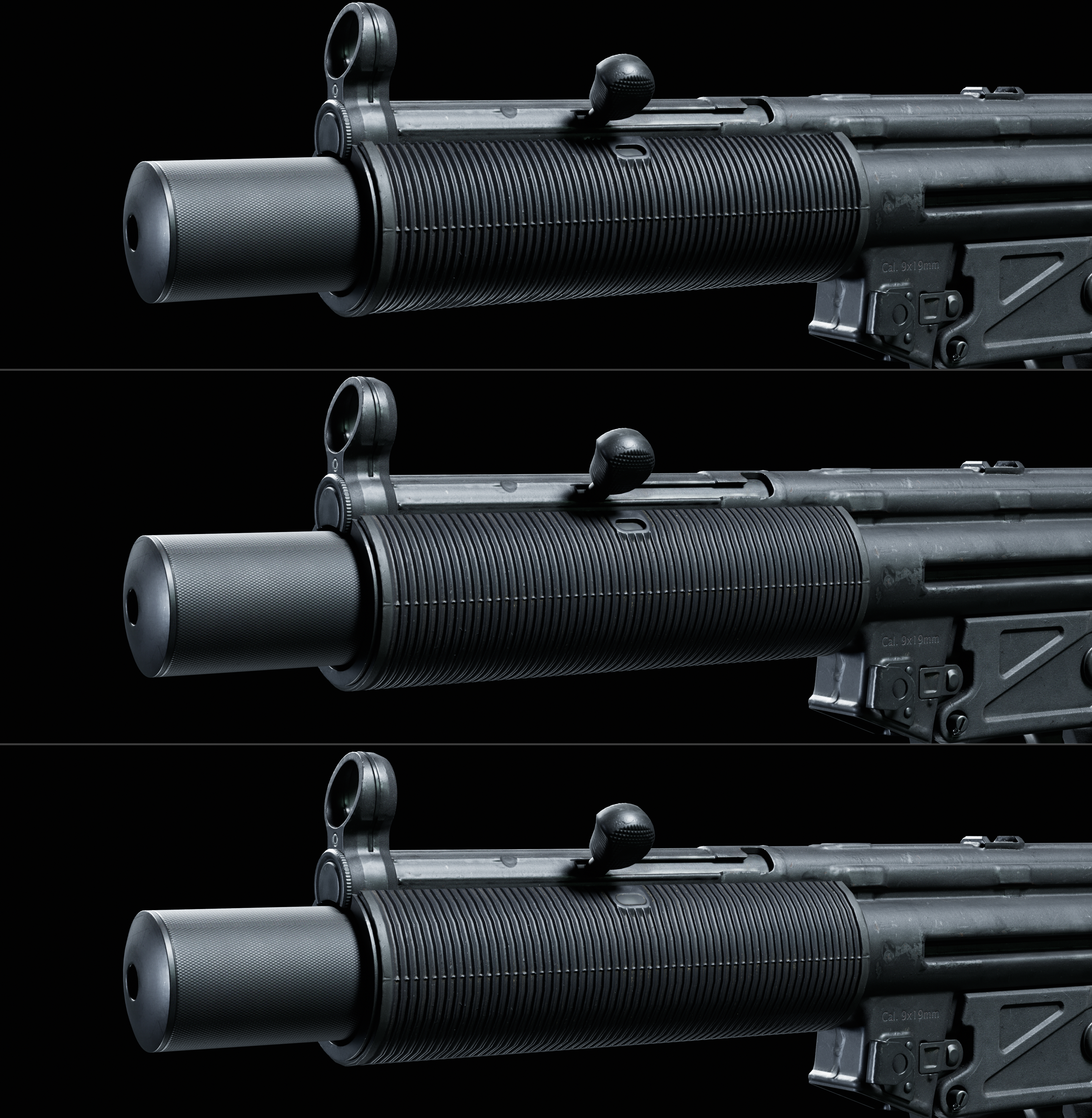
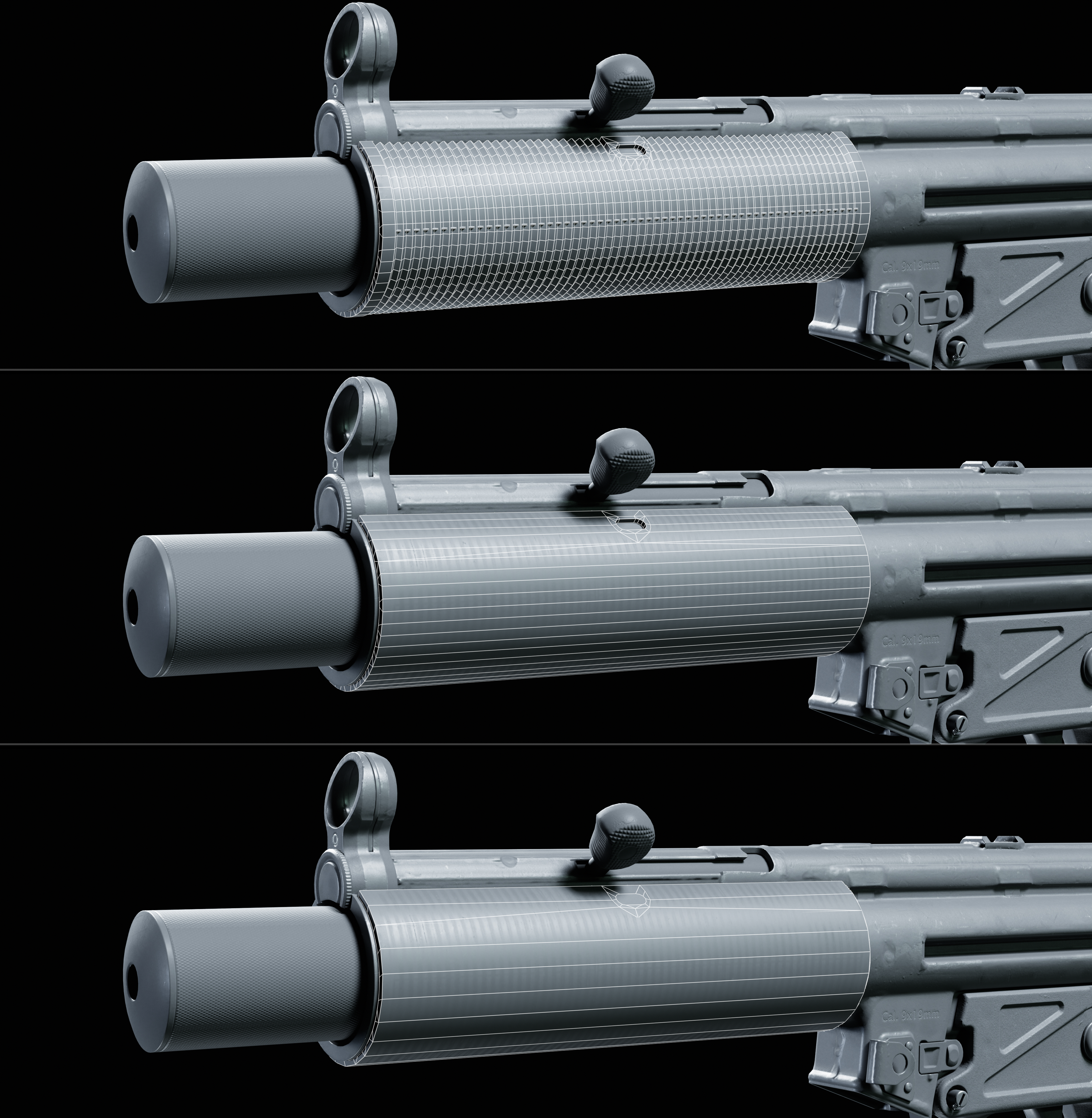
Consistent normal direction makes baked detail and highlights more stable as geometry is reduced. Good normal management preserves large forms, improves LOD transitions, and prevents noisy stereo reflections when a VR player rotates the weapon.
Another important part of low-poly preparation is controlling normal direction for aggressive LOD generation.
By assigning consistent or unified normal directions to selected polygon groups, we can make the asset more friendly to tangent-space normal maps and future LODs. This helps preserve stable shading when geometry is reduced.
In practice, this means the artist should think about shading not only for the final close-up mesh, but also for how the asset will degrade at distance or under performance constraints.
Clean normal direction can help:
- Reduce visible shading artifacts
- Make baked details more stable
- Improve LOD transitions
- Preserve the visual read of large forms
- Avoid noisy highlights on simplified geometry
- Make the asset easier to optimize later
For weapon art, this is especially important because reflections and highlights are perceived in stereo and in motion. Poor normal management can make a surface feel unstable, broken, or visually noisy when the player rotates the object in their hands.
Production Principle
A low-poly asset should not feel like a simplified copy of the high-poly model. It should feel like a carefully engineered real-time representation of it.
The low-poly stage is not simply about reducing triangles. It is about building a real-time version of the asset that keeps the artistic intent, preserves the silhouette, supports animation, works with the texture bake, and remains stable under the performance constraints.